Matrix representations of quantum logic gates

Interested in learning how to program quantum computers? Then check out our Qiskit textbook Introduction to Quantum Computing with Qiskit.

Introduction

This tutorial will introduce you to unitary matrices and how they are used for representing quantum logic gates.

Qubits and vectors

For qubits the computational basis (0 and 1) is represented by two ket vectors:

|0⟩ = 0 

|1⟩ = 1

These vectors can be represented as column vectors which are very useful as you will find later:

|1〉=

|0〉=

CodeCogsEqn (11).gif

How Matrices represent Quantum logic gates

Matrices are very powerful in quantum computing as they can be used to represent quantum logic gates.

For example the Pauli-X gate:

This is a single qubit gate that flips |0⟩ to |1⟩ and vice versa.

In matrix form it is represented as:

CodeCogsEqn (2).gif

Using this matrix we can use matrix multiplication to see how the Pauli-X gate operates on an input state.

For example if our input state is |1〉:

|1〉=

CodeCogsEqn (6).gif

We then multiply the column vector corresponding to |1〉by the Pauli-X matrix:

CodeCogsEqn (7).gif
CodeCogsEqn (10).gif

Which = |0〉which is correct as the X gate flips |1〉to |0〉and vice versa.

Likewise if our input state is |0〉:

|0〉=

CodeCogsEqn (11).gif

Then again multiply the Pauli-X matrix by the column vector corresponding to |0〉:

CodeCogsEqn (12).gif
CodeCogsEqn (13).gif

Which = |1〉

Matrix representation of the Z-gate

The Z-gate is a single qubit gate that flips the phase of the qubit such that |0〉is unchanged but |1〉is flipped to -|1〉

We have released a separate tutorial on the Z-gate in detail: https://quantumcomputinguk.org/tutorials/z-gate

The identity matrix for the Z-gate is :

CodeCogsEqn (14).gif

Let’s see how the Z matrix transforms the state of |1〉:

Remember that the column vector for |1〉:

CodeCogsEqn (6).gif

We then multiply the column vector by the Z matrix:

CodeCogsEqn (19).gif
CodeCogsEqn (20).gif

Which = -|1〉

How to get real time information on IBM Quantum devices using backend_monitor

Interested in learning how to program quantum computers? Then check out our Qiskit textbook Introduction to Quantum Computing with Qiskit.

Introduction

In a previous tutorial we showed how you can get basic information on all quantum devices using backend_overview().

While this function is great to get information on all quantum devices at a glance it is not detailed on specific information such as qubit and gate errors. To get more detailed information on a quantum device (such as configuration and individual qubits and gates) you can use backend_monitor().

Implementation

Unlike backend_overview() this is for getting information on a specific device so you have to pass the device name in to the function as an argument.

For example to get real time information on the IBMQ Burlngton device you enter the following:

backend_monitor(provider.backends.ibmq_burlington)

and for another device like IBMQ Vigo:

backend_monitor(provider.backends.ibmq_vigo)

Steps

  1. Copy and paste the code below in to a python file

  2. Enter your API token in the IBMQ.enable_account('Insert API token here') part

  3. Save and run

Code

from qiskit import IBMQ from qiskit.tools.monitor import backend_monitor  IBMQ.enable_account('ENTER API KEY HERE') # Insert your API token in to here provider = IBMQ.get_provider(hub='ibm-q')  backend_monitor(provider.backends.ibmq_burlington) # Function to get all information back about a quantum  device    print('\nPress any key to close') input() 

Output

After the code is ran you will be given a list of information about the device including the configuration and specific information on individual qubits and gates.

Screenshot showing the device information for the IBMQ Burlington quantum device.

Screenshot showing the device information for the IBMQ Burlington quantum device.

Performing Addition on IBMs Quantum Computers

Interested in learning how to program quantum computers? Then check out our Qiskit textbook Introduction to Quantum Computing with Qiskit.

Introduction

In this tutorial you will see how to implement the quantum equivalent of a Full Adder on IBMs quantum computers using quantum logic gates.

What is a Full Adder?

A Full Adder is a logic circuit used by classical computers to implement addition on up to 3 bits.

Source: circuitTHEORY

Source: circuitTHEORY


The Full Adder circuit contains 3 inputs: A, B, and Cin (short for Carry in.as it carries in from the previous Full Adder since they can be stringed together)

There are also 2 outputs called Sum and Cout (Short for carry out as it carries out a bit to the Cin of the next adder)

Truth Table

2019-12-11 20_09_42-Window.png

Implementation

Circuit diagram of a quantum full adder

Circuit diagram of a quantum full adder

To implement a Full Adder on a quantum computer we will need 4 qubits (ie 1 for each input and output of the Full Adder).

  • Q0: Qubit for input A

  • Q1: Qubit for Input B

  • Q2: Qubit for Input Cin

  • Q3: Qubit for Sum

  • Q4: Qubit for Cout


How it works

For calculating the Sum we simply apply a CNOT gate to Q3 (Sum) from all inputs. This means that if any one of the inputs are 1 then Q3 will be flipped to 1. If all inputs are 0 then Q3 will remain 0.

To calculate Cout (Q4) we apply Toffoli gates with Q4 as the target and the input combinations (Q0,Q1), (Q0,Q2), (Q1,Q2) as the control qubits.

Note: Because of the order of the gates we can never get the Sum and Cout to both equal 1 if only 2 of the inputs are 1.

Code

print('\n Quantum Full Adder')
print('---------------------')

from qiskit import QuantumRegister
from qiskit import ClassicalRegister
from qiskit import QuantumCircuit, execute,IBMQ
from qiskit.tools.monitor import job_monitor

IBMQ.enable_account('INSERT API TOKEN HERE')
provider = IBMQ.get_provider(hub='ibm-q')

######## A ###########################
q = QuantumRegister(5,'q')
c = ClassicalRegister(2,'c')

circuit = QuantumCircuit(q,c)
circuit.x(q[0])
circuit.cx(q[0],q[3])
circuit.cx(q[1],q[3])
circuit.cx(q[2],q[3])
circuit.ccx(q[0],q[1],q[4])
circuit.ccx(q[0],q[2],q[4])
circuit.ccx(q[1],q[2],q[4])

circuit.measure(q[3],c[0])
circuit.measure(q[4],c[1])
########################################
backend = provider.get_backend('ibmq_qasm_simulator')
job = execute(circuit, backend, shots=1)

print('\nExecuting...\n')
print('\nA\n')

job_monitor(job)
counts = job.result().get_counts()
print('RESULT: ',counts,'\n')
######## B ###########################
q = QuantumRegister(5,'q')
c = ClassicalRegister(2,'c')

circuit = QuantumCircuit(q,c)
circuit.x(q[1])
circuit.cx(q[0],q[3])
circuit.cx(q[1],q[3])
circuit.cx(q[2],q[3])
circuit.ccx(q[0],q[1],q[4])
circuit.ccx(q[0],q[2],q[4])
circuit.ccx(q[1],q[2],q[4])

circuit.measure(q[3],c[0])
circuit.measure(q[4],c[1])
######################################
job = execute(circuit, backend, shots=1)
print('\nB\n')

job_monitor(job)
counts = job.result().get_counts()
print('RESULT: ',counts,'\n')
######## A + B ###########################
q = QuantumRegister(5,'q')
c = ClassicalRegister(2,'c')

circuit = QuantumCircuit(q,c)
circuit.x(q[0])
circuit.x(q[1])
circuit.cx(q[0],q[3])
circuit.cx(q[1],q[3])
circuit.cx(q[2],q[3])
circuit.ccx(q[0],q[1],q[4])
circuit.ccx(q[0],q[2],q[4])
circuit.ccx(q[1],q[2],q[4])

circuit.measure(q[3],c[0])
circuit.measure(q[4],c[1])
######################################
job = execute(circuit, backend, shots=1)
print('\nA + B\n')
job_monitor(job)
counts = job.result().get_counts()
print('RESULT: ',counts,'\n')
######## Cin ###########################
q = QuantumRegister(5,'q')
c = ClassicalRegister(2,'c')

circuit = QuantumCircuit(q,c)
circuit.x(q[2])
circuit.cx(q[0],q[3])
circuit.cx(q[1],q[3])
circuit.cx(q[2],q[3])
circuit.ccx(q[0],q[1],q[4])
circuit.ccx(q[0],q[2],q[4])
circuit.ccx(q[1],q[2],q[4])

circuit.measure(q[3],c[0])
circuit.measure(q[4],c[1])
######################################
job = execute(circuit, backend, shots=1)
print('\nCin\n')
job_monitor(job)
counts = job.result().get_counts()
print('RESULT: ',counts,'\n')
######## Cin + A ###########################
q = QuantumRegister(5,'q')
c = ClassicalRegister(2,'c')

circuit = QuantumCircuit(q,c)
circuit.x(q[2])
circuit.x(q[0])
circuit.cx(q[0],q[3])
circuit.cx(q[1],q[3])
circuit.cx(q[2],q[3])
circuit.ccx(q[0],q[1],q[4])
circuit.ccx(q[0],q[2],q[4])
circuit.ccx(q[1],q[2],q[4])

circuit.measure(q[3],c[0])
circuit.measure(q[4],c[1])
######################################
job = execute(circuit, backend, shots=1)
print('\nCin + A\n')
job_monitor(job)
counts = job.result().get_counts()
print('RESULT: ',counts,'\n')
######## Cin + B ###########################
q = QuantumRegister(5,'q')
c = ClassicalRegister(2,'c')

circuit = QuantumCircuit(q,c)
circuit.x(q[2])
circuit.x(q[1])
circuit.cx(q[0],q[3])
circuit.cx(q[1],q[3])
circuit.cx(q[2],q[3])
circuit.ccx(q[0],q[1],q[4])
circuit.ccx(q[0],q[2],q[4])
circuit.ccx(q[1],q[2],q[4])

circuit.measure(q[3],c[0])
circuit.measure(q[4],c[1])
######################################
job = execute(circuit, backend, shots=1)
print('\nCin + B\n')
job_monitor(job)
counts = job.result().get_counts()
print('RESULT: ',counts,'\n')
######## Cin + A + B ###########################
q = QuantumRegister(5,'q')
c = ClassicalRegister(2,'c')
circuit = QuantumCircuit(q,c)

circuit.x(q[2])
circuit.x(q[1])
circuit.x(q[0])
circuit.cx(q[0],q[3])
circuit.cx(q[1],q[3])
circuit.cx(q[2],q[3])
circuit.ccx(q[0],q[1],q[4])
circuit.ccx(q[0],q[2],q[4])
circuit.ccx(q[1],q[2],q[4])

circuit.measure(q[3],c[0])
circuit.measure(q[4],c[1])
######################################
job = execute(circuit, backend, shots=1)
print('\nCin + A + B\n')

job_monitor(job)
counts = job.result().get_counts()

print('RESULT: ',counts,'\n')
print('Press any key to close')
input()
Output

Once you run the code you will get the following output:

2019-12-11 19_53_58-Window.png

16-Qubit Random Number Generator

Interested in learning how to program quantum computers? Then check out our Qiskit textbook Introduction to Quantum Computing with Qiskit.

This tutorial will show you how to create a Random Number Generator in qiskit for IBMs quantum computers.

Implementation

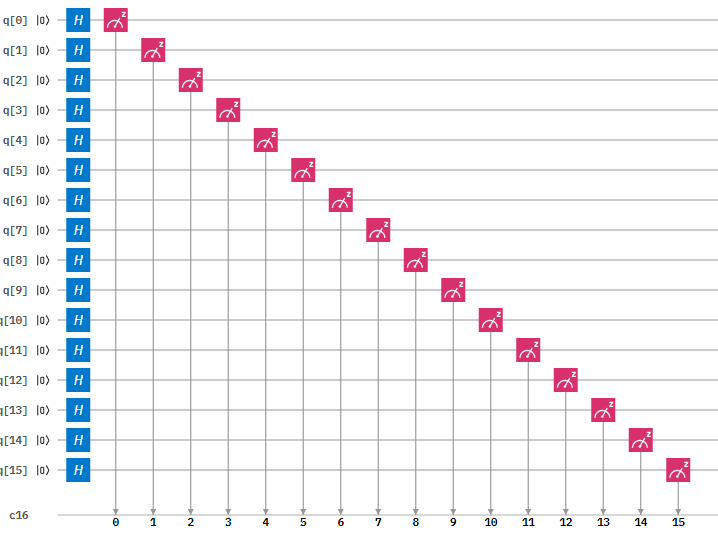
Figure 1: Circuit Diagram of the 16-qubit Random Number Generator

Figure 1: Circuit Diagram of the 16-qubit Random Number Generator

Step 1: Initialise the quantum and classical registers

The first step is to initialise a 16 qubit register . This is done by the following code:

q = QuantumRegister(16,'q')

Next we initialise the 16 bit classical register with the following code:

c = ClassicalRegister(16,'c')

Step 2: Create the circuit

Next we create quantum circuit using the following code:

circuit = QuantumCircuit(q,c)

Step 3: Apply a Hadamard gate to all qubits

Then we need to apply a Hadamard gate. This gate is used to put a qubit in to a superposition of 1 and 0 such that when we measure the qubit it will be 1 or a 0 with equal probability.

This is done with the following code:

circuit.h(q)

Step 4: Measure the qubits

After this we measure the qubits. This measurement will collapse the qubits superposition in to either a 1 or a 0.

This is done with the following code:

circuit.measure(q,c)

How to run the program

  1. Copy and paste the code below in to a python file

  2. Enter your API token in the IBMQ.enable_account('Insert API token here') part

  3. Save and run

Code

from qiskit import QuantumRegister, ClassicalRegister, QuantumCircuit, execute,IBMQ
from qiskit.tools.monitor import job_monitor

IBMQ.enable_account('ENTER API TOKEN HERE')
provider = IBMQ.get_provider(hub='ibm-q')

q = QuantumRegister(16,'q')
c = ClassicalRegister(16,'c')
circuit = QuantumCircuit(q,c)
circuit.h(q) # Applies hadamard gate to all qubits
circuit.measure(q,c) # Measures all qubits 

backend = provider.get_backend('ibmq_qasm_simulator')
job = execute(circuit, backend, shots=1)
                               
print('Executing Job...\n')                 
job_monitor(job)
counts = job.result().get_counts()

print('RESULT: ',counts,'\n')
print('Press any key to close')
input()

Output

Once you have ran the program you will get the following output:

2019-09-23 19_38_44-Window.png

Getting real time information on IBM Quantum devices

Interested in learning how to program quantum computers? Then check out our Qiskit textbook Introduction to Quantum Computing with Qiskit.

Introduction

IBMs quantum devices all vary whether its in terms of the number of qubits, pending jobs to those devices or whether they are operational at a certain time.

With the backend_overview() function however we can see at a glance information for all those devices which can be very useful if we are deciding what device we should send our program to.

Steps

  1. Copy and paste the code below in to a python file

  2. Enter your API token in the IBMQ.enable_account('Insert API token here') part

  3. Save and run

Code

print('\nDevice Monitor') print('----------------')  from qiskit import IBMQ from qiskit.tools.monitor import backend_overview  IBMQ.enable_account('Insert API token here') # Insert your API token in to here provider = IBMQ.get_provider(hub='ibm-q')  backend_overview() # Function to get all information back about each quantum device    print('\nPress any key to close') input()

Output

After running the code you will see something like the following printed on the screen :

Output showing the status of each quantum device

Output showing the status of each quantum device

Want to learn about Quantum Programming? Head over to Quantum Computing UK: https://quantumcomputinguk.org/

Getting Started with Qiskit

If you want to start creating programs for IBMs Quantum Computers then the best way is to use Qiskit.

Qiskit is a framework for quantum computing, allowing you to create programs and then run them either on simulators or on IBMs quantum devices.

Requirements

Installation

  1. Install Python 3.x (Make sure Python is added to Path and Pip is checked)

  2. Open Command Prompt and type in: pip install qiskit

  3. Profit!

To Check that qiskit is working download one of our example programs from the code repository here